Sa2web logoSa2webZero-trust remote browser for AI and humans
Sign inBuy license
Enterprise browser bastion

Turn the browser into an internal-access bastion

Centralize access to internal systems and business applications through an enterprise browser bastion, support secure BYOD access, keep origin scripts, cookies, sessions and sensitive data in a controlled workspace, and manage permissions, employee transitions, watermarking and audit centrally.

Enterprise browser bastionOrigin scripts and cookies stay remoteSecure BYOD accessEmployee transition governanceSensitive-data protectionDOM replay audit
Browser bastion capabilitiesSa2web

Unified access checkpoint

Route business applications, knowledge bases and internal tools through one governed browser entry.

Sensitive-data protection

Configure masking, copy protection and watermarking centrally.

Scripts and cookies stay remote

Origin scripts, cookies and sessions run inside the controlled workspace.

Audit replay

Trace critical actions for review and internal control.

Employee transitions

Workspace entries and access scope can be adjusted centrally during onboarding, transfers and offboarding.

Secure BYOD access

Employee-owned devices access approved workspaces while sensitive credentials stay remote.

Core Capabilities

Keep every web visit inside a controlled boundary

More than a browser: an enterprise browser bastion for internal resources with permissions, audit replay, sensitive-data protection, and remote handling for origin scripts and cookies.

👤

Credentials, scripts and cookies stay remote

Internal-system credentials, origin scripts, cookies and sessions stay in a controlled workspace instead of being stored on local devices.

🛡

Sensitive data stays remote

Mask, hide and prevent copying of sensitive fields so operation and visibility can be managed separately.

🔗

Browser bastion entry

Employees use authorized entries while administrators manage resource addresses, access scope and access records centrally.

📱

BYOD access

Employees can use built-in browsers on computers and phones while sensitive credentials and business data stay in the controlled workspace.

👥

Employee transition governance

Adjust workspace entries and resource scope by role during onboarding, transfers and offboarding to reduce handover gaps.

🎬

DOM replay and audit

Record page actions and state changes for audit, review, training and security governance.

⚙️

Policy configuration

Configure access scope, watermarking, masking, copy protection and log retention in one place.

☁️

Private deployment

Run in private cloud, on premises or hybrid environments so data stays under your control.

Enterprise Governance

Bring internal access, sensitive data, employee transitions and audit requirements into one browser bastion

The homepage explains the enterprise workspace directly with fewer scattered entry points.
🏢

Enterprise browser bastion

  • Unified entry for business applications and knowledge bases
  • Origin scripts, cookies and sessions stay off employee endpoints
  • DOM replay provides stronger evidence for audits
📱

Secure BYOD work

  • No dedicated client required on personal devices
  • Credentials and sessions remain in the controlled workspace
  • Device changes and offboarding are easier to govern
👥

Cleaner employee transitions

  • Assign workspace entries by role
  • Adjust permissions and watermark policies during handovers
  • Retain operation history for training and accountability
🛡

Sensitive-data protection

  • Mask or hide key fields by role
  • Centralize copy protection and watermarking
  • Reduce misoperation and leakage risk

Audit and compliance review

  • Record key operations and access logs
  • Support security review, training and troubleshooting
  • Private deployment keeps data boundaries clear
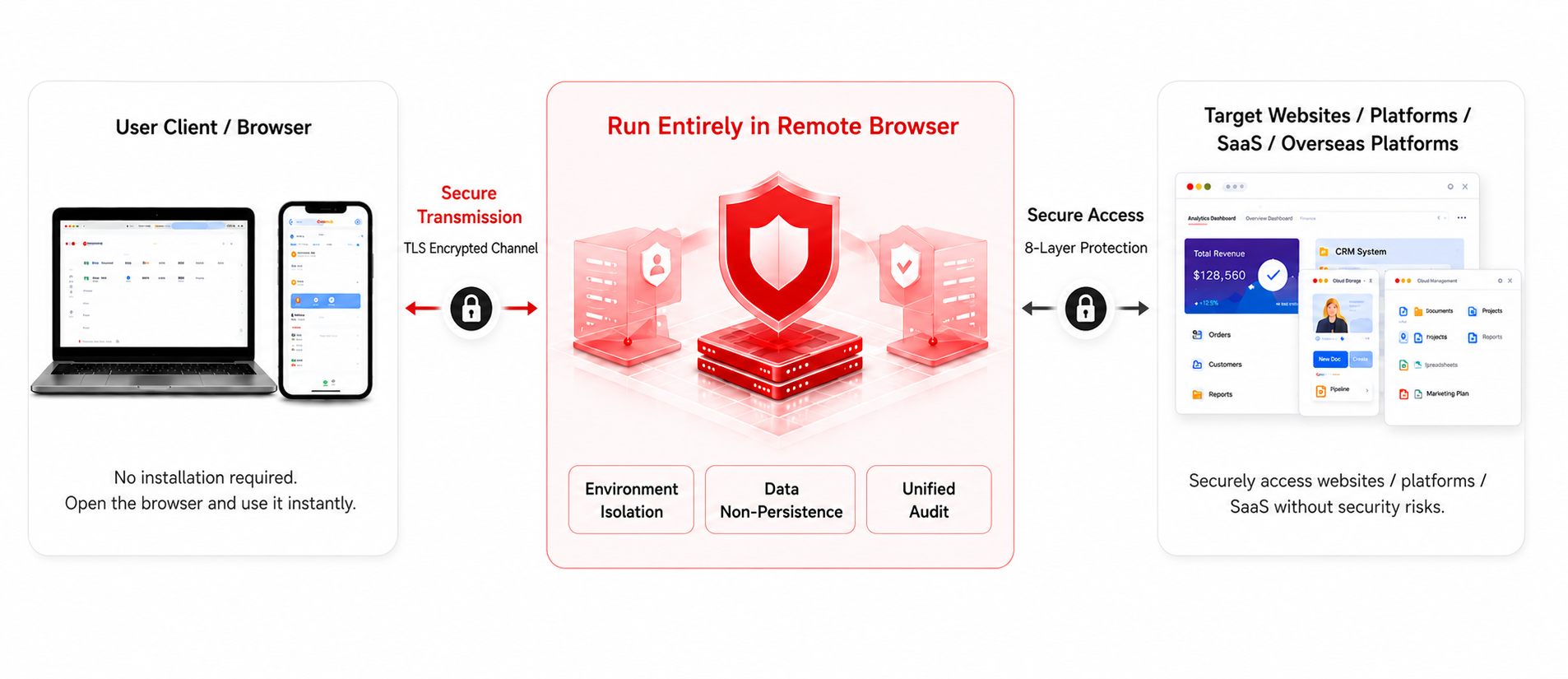
Security Architecture / How It Works

The remote browser isolates, protects and audits between the user browser and the target site

Security architecture diagram
Enterprise browser bastion
Secure BYOD access
Employee transition governance
TLS encrypted transport and isolation
Unified permissions and audit
Private deployment
Advantages

Built for serious workflows beyond local tools and ordinary cloud browsers

Sa2web
  • Internal access is centralized through a browser bastion
  • Unified permissions reduce misuse and leakage risk
  • Origin scripts, cookies and sensitive credentials stay off employee endpoints
  • Entries, permissions and logs are handled centrally during employee transitions
  • Central policy configuration improves governance
  • Private deployment keeps data under your control
VS
Traditional local browser
  • Credentials, cookies and page data are easier to scatter
  • Local environments are scattered and harder to govern
  • Employee-owned devices are harder to govern consistently
  • Handovers depend on manual checklists and can miss permissions or context
  • Fragmented policies increase management cost
  • Data is scattered and harder to protect
Ordinary cloud browser
  • Some credential, cookie and business-data exposure risk remains
  • Environment isolation can be limited
  • Team collaboration is often weak
  • Transition workflows and audit trails often require extra systems
  • Limited customization and extension
  • Higher cost with uncertain stability
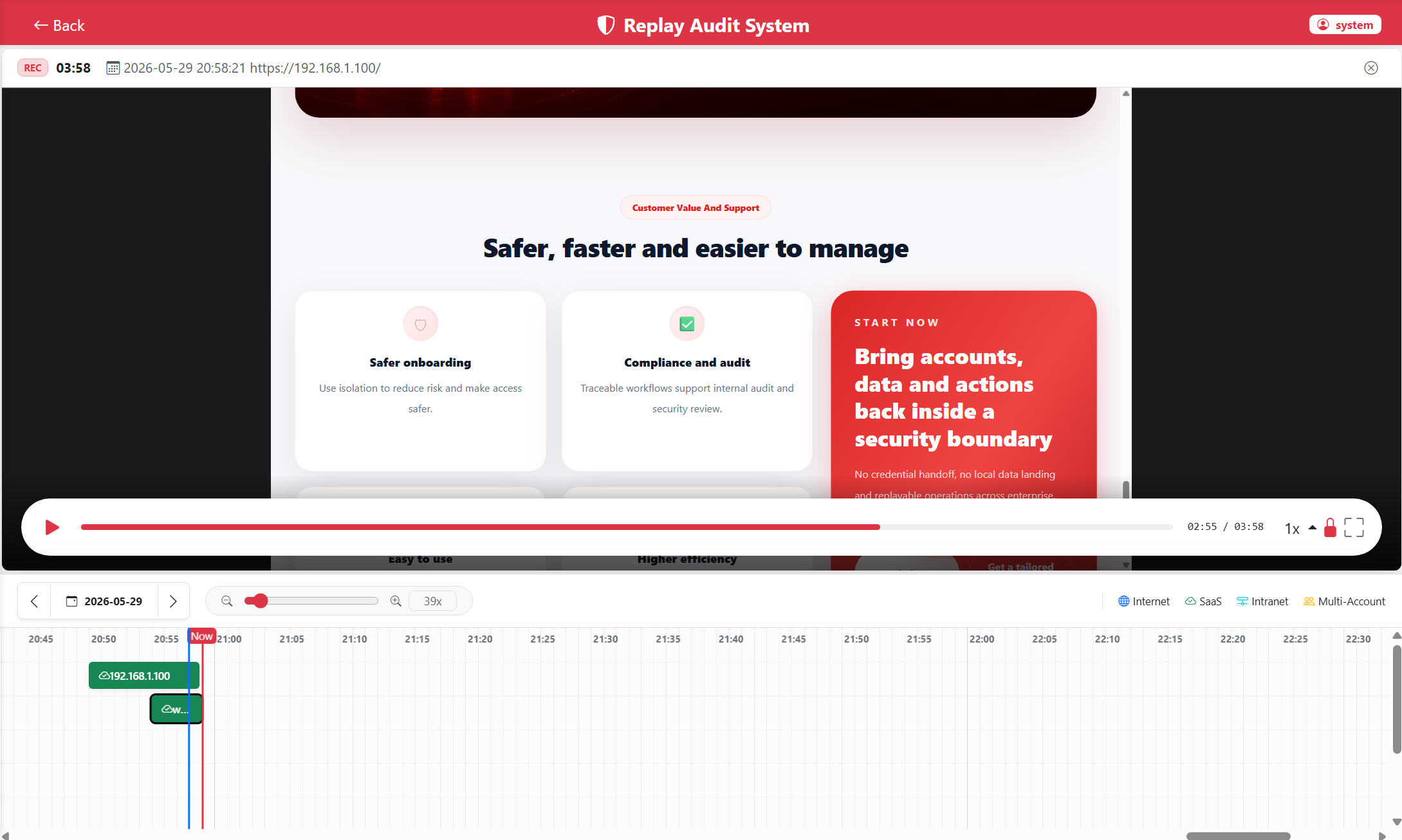
DOM Recording And Replay

Make audit, review and troubleshooting easier

DOM replay player
📝

Full operation replay

Reconstruct operation trails so audit and review are visual and evidence-based.

Events and timeline

Show key events with a synchronized timeline to find the exact point of an issue.

🔎

Search and analytics

Search by user, time, operation type and other dimensions for tracking.

📦

High-fidelity page records

Pages remain selectable and compact to store, suitable for long-running recording.

Private Deployment

Keep data in your domain with controlled and compliant deployment

Support private cloud, on-premises and hybrid deployment with identity, access control, isolation, logs, high availability and scaling in one architecture.

Hybrid / on-prem / private cloud

Deploy according to your existing IT architecture.

Data stays in your domain

Sensitive information remains under your own control.

Fine-grained permissions

Unify identity, roles and access governance.

Compliance-ready audit

Meet internal control, audit and security requirements.

Customer Value And Support

Safer, faster and easier to manage

🛡

Safer onboarding

Use isolation to reduce risk and make access safer.

Compliance and audit

Traceable workflows support internal audit and security review.

Easy to use

Lightweight access reduces deployment and training cost.

📈

Higher efficiency

Unified entry and management improve team collaboration.

Start Now

Use a browser bastion for enterprise internal access

Controlled permissions, remote origin scripts and cookies, less local data exposure, replayable operations and cleaner employee transitions for enterprise internal-system access.

Enterprise browser bastionScripts and cookies stay remoteEmployee transition governanceControlled data security